Weekly management dashboard
A business imports sales, job, and finance data every week. The dashboard shows trends, overdue work, conversion rates, and AI-generated summary notes for the management meeting.
Internal Tools & Dashboards
Give your team one clear place to manage work, track progress, and see the numbers that matter.
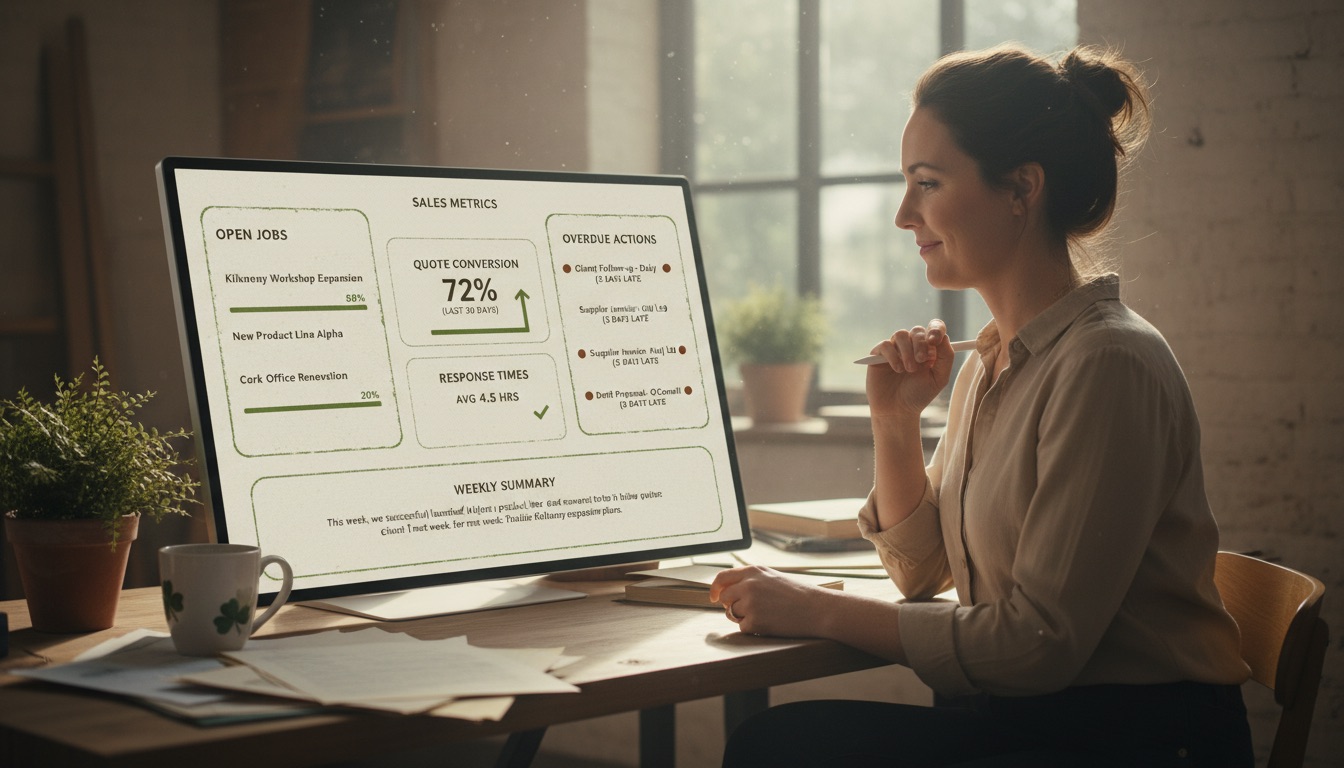
Dashboard preview
A simplified version of the kind of weekly dashboard we build for management teams — KPIs, trends, and a plain-English summary by AI.
The problem
If every weekly report requires spreadsheets, emails, screenshots, and manual explanations, the business is working too hard to see what is already happening. Dashboards help when the same questions come up repeatedly and the data is spread across tools.
For many Irish SMEs, the problem is not a lack of effort. The problem is that everyday work is spread across email, spreadsheets, shared drives, paper notes, WhatsApp messages, CRMs, accounting software, and staff memory. That creates delays, duplicated work, missed follow-ups, inconsistent customer experiences, and reporting that takes too long to prepare.
AI can help, but only when it is attached to a clear workflow. A tool on its own does not fix a broken process. The useful version starts by asking: what task repeats, who owns it, what information is needed, what decision has to be made, and what should happen next?
What are internal tools and dashboards?
Internal tools are custom systems used by staff to manage work. Dashboards are visual reporting views that show important data, statuses, tasks, and trends. Together, they help teams act faster and make better decisions.
We avoid the common mistake of beginning with a technology and then looking for a use case. Instead, we begin with the business workflow. That means we look at the work your team already does and decide where AI, automation, dashboards, custom tools, or training can remove friction.
The result should be practical. Staff should understand it. Managers should be able to see whether it works. Customers should experience faster, clearer service. The business should be able to improve it over time without starting again from scratch.
What this can include
Track the numbers that matter each week.
See job status, blockers, owners, and deadlines.
Track enquiries, quotes, conversion, and follow-up.
Manage tasks, approvals, handovers, and internal workflows.
Generate plain-English summaries of dashboards or reports.
These are not abstract AI ideas. They are the kinds of workflows where small improvements can compound: fewer manual steps, fewer unanswered messages, fewer duplicate entries, better handovers, and more consistent outputs.
Example workflows
A business imports sales, job, and finance data every week. The dashboard shows trends, overdue work, conversion rates, and AI-generated summary notes for the management meeting.
A trades business tracks every job from enquiry to quote, scheduled visit, completion, invoice, and follow-up.
A professional services firm tracks client onboarding, missing documents, deadlines, and team workload in one view.
It is especially useful when the business has a real workflow problem but does not yet know whether the answer should be AI, automation, a dashboard, a portal, staff training, or a custom app. That uncertainty is normal. Our role is to help you choose the right first project rather than overbuild.
The best projects have a clear owner, a visible business pain, a realistic budget, and a willingness to start with version one rather than trying to build everything at once.
How we work
We start by understanding the process as it works today. We look at who is involved, what information moves through the process, where delays happen, what tools are already used, and what outcome matters to the business.
We define the version one scope so the team knows exactly what will be built, what is included, what is excluded, and what success looks like.
We build the workflow, tool, dashboard, app, or automation. We test it with realistic examples, check the handover points, review permissions, and prepare the team to use it.
Once staff and customers use the tool, we refine language, adjust logic, add missing steps, simplify screens, and improve reporting. This is why we recommend ongoing support for most builds.
Tools and implementation
We choose tools based on the workflow, not fashion. A project may use AI assistants, automation platforms, spreadsheets, CRMs, databases, custom web apps, reporting dashboards, or integrations with systems your team already uses.
The important thing is that the system fits your business. We do not force every client into one platform. We choose the simplest reliable setup that can deliver the outcome, be maintained, and scale sensibly as the business learns what it needs.
Data, privacy, and human review
If the workflow involves private, financial, legal, medical, employee, or customer data, we design the scope carefully. The goal is to minimise unnecessary data, keep humans in control of important decisions, and review access rules before launch.
For many SME workflows, the safest first version is human-in-the-loop. That means AI can draft, classify, summarise, suggest, or prepare, but a person reviews important outputs before they are sent to a customer, used in a decision, or stored as a final record.
Pricing and next step
Focused dashboards usually start from €3,000–€8,000. More complex internal tools, multi-user dashboards, integrations, and permissioned views are quoted after scoping.
The normal starting point is an AI Opportunity Audit. The audit gives you a clear recommendation, a scoped first project, likely risks, and a fixed-price build option.
Why Tús AI
Tús AI is built for Irish SMEs that want practical AI implementation, not vague AI hype. We focus on useful workflows, realistic budgets, clear scopes, staff adoption, and support after launch.
Our approach is intentionally simple: start with one business problem, build one useful solution, prove value, and expand what works. That is how SMEs can benefit from AI without creating a complicated technology programme or hiring a full development team.
We are also careful about the difference between a demo and a business tool. A demo looks impressive for five minutes. A business tool has to work for staff, customers, managers, and the real exceptions that happen every week. That is why we include scoping, testing, access review, handoff, and support in the way we work.
FAQs
It can use spreadsheets, forms, CRMs, accounting tools, databases, project management tools, or manual imports depending on the setup.
Often yes, if the data source allows it. Sometimes a simple scheduled import is the most practical first step.
Yes. Role-based views can be included where the workflow requires it.
Yes. AI can help create plain-English summaries, highlight trends, or prepare management notes, but important decisions should remain human-led.
No, but we need to understand the current data quality. A dashboard can also expose where data collection needs improvement.
Get started
Tell us where your team is losing time. We will help you identify one workflow that can be improved with AI, automation, a dashboard, or a custom tool, then show you the practical path to build it.